English
English

SalesDash can connect to your Carerix system, after which you can use your recruitment data — such as matches moving through their stages and placements — in your dashboards and gamification metrics.
Before starting, please read the general principles
SalesDash connects to Carerix as a client: a dedicated login for one application. You need to be a system administrator in Carerix to create one.
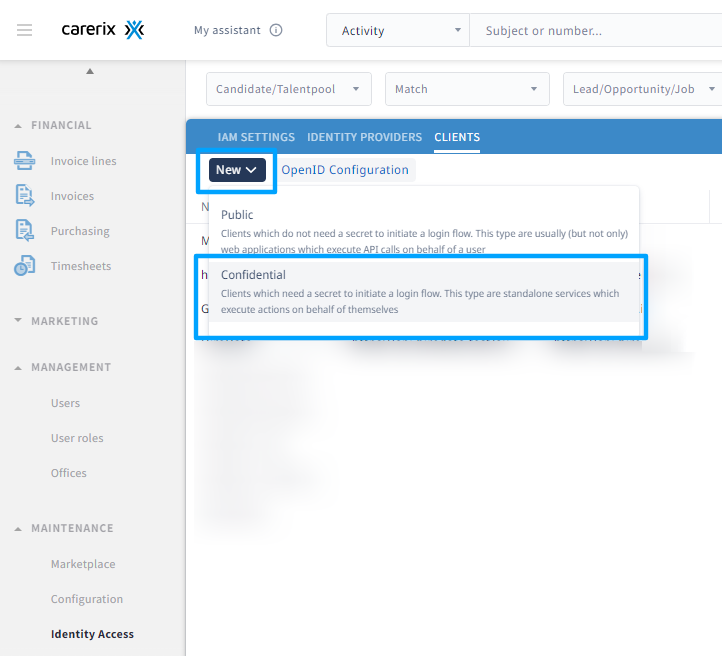
In Carerix, go to Maintenance > Identity Access and open the Clients tab. Click New and choose Confidential: SalesDash connects on its own behalf, not on behalf of one of your users.
Fill in the New client form:
SalesDashurn:salesdash/connectorurn:cx/cx5Wrapper:data:manage, which gives access to your Carerix dataYes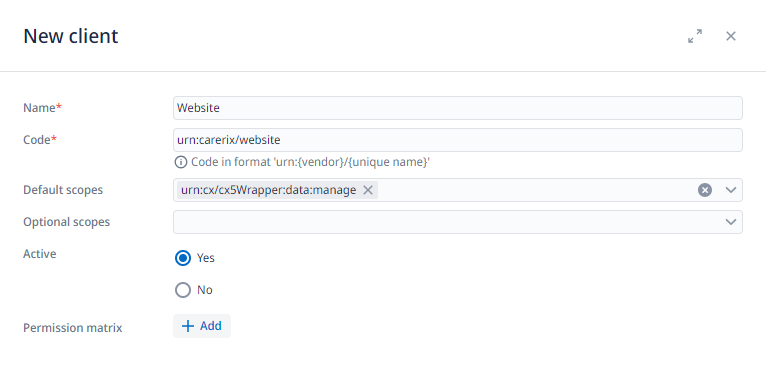
Click Save. Carerix now shows your new Client Secret and Client ID. Copy the client secret right away: Carerix shows it only once. The client ID stays available in the client's details.
Why does SalesDash ask for data:manage?
Carerix offers no read-only scope: data:manage is the only one that gives access to your data. SalesDash only reads your data and never changes it.
Finally, click OpenID Configuration, next to New on the Clients tab.
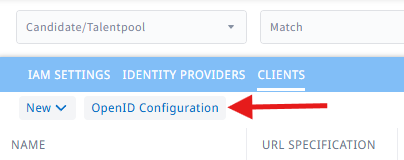
Your browser opens a new tab showing your Carerix system's configuration. Select everything on that page (Ctrl+A, or Cmd+A on a Mac) and copy it. SalesDash only needs the token_endpoint from it, which is specific to your Carerix system, and picks it out for you.

Go to Providers > Providers in the SalesDash admin and create a new provider. Choose "Carerix" as the type and click "Create".
On the page that opens, fill in:
token_endpoint works too.Click "Save changes". The client secret now shows "Configured" in green.
Once the provider is saved, SalesDash can read your Carerix system. Which Carerix changes are imported — for example a match reaching the "proposed to client" stage — and as what, is set up with processors: see getting started with integrations.
Three templates give you a head start:
Carerix status: <stage name>, dated at the change and credited to the match owner. A metric such as "Proposals" then counts the activities of the stages you choose.Carerix placement activity, credited to the placement owner.